
How MyCardFlow Identifies Cards With AI and Checklist Matching
Two real scans show how checklist data helps flag conflicting parallel names and identify more specific inserts.
MyCardFlow helps you identify cards and create eBay card listings. Upload your photos, review the results, and list cards individually, in bulk lots, or as You-Pick listings.
To help identify cards accurately, MyCardFlow combines AI image recognition with checklist matching. AI reads visible details such as the player, year, set, card number, and serial numbering. Where applicable checklist data is available, MyCardFlow checks those details against catalog records to refine an identification or flag a disagreement.
MyCardFlow’s catalog includes 10M+ card and printing records and candidates. That provides a substantial reference for matching, but the value becomes clearer when you see what happens with an individual card. These Bryce Harper and Christian Yelich examples show two different ways checklist matching helps.
Identifying a Numbered Parallel: Bryce Harper Aqua /199
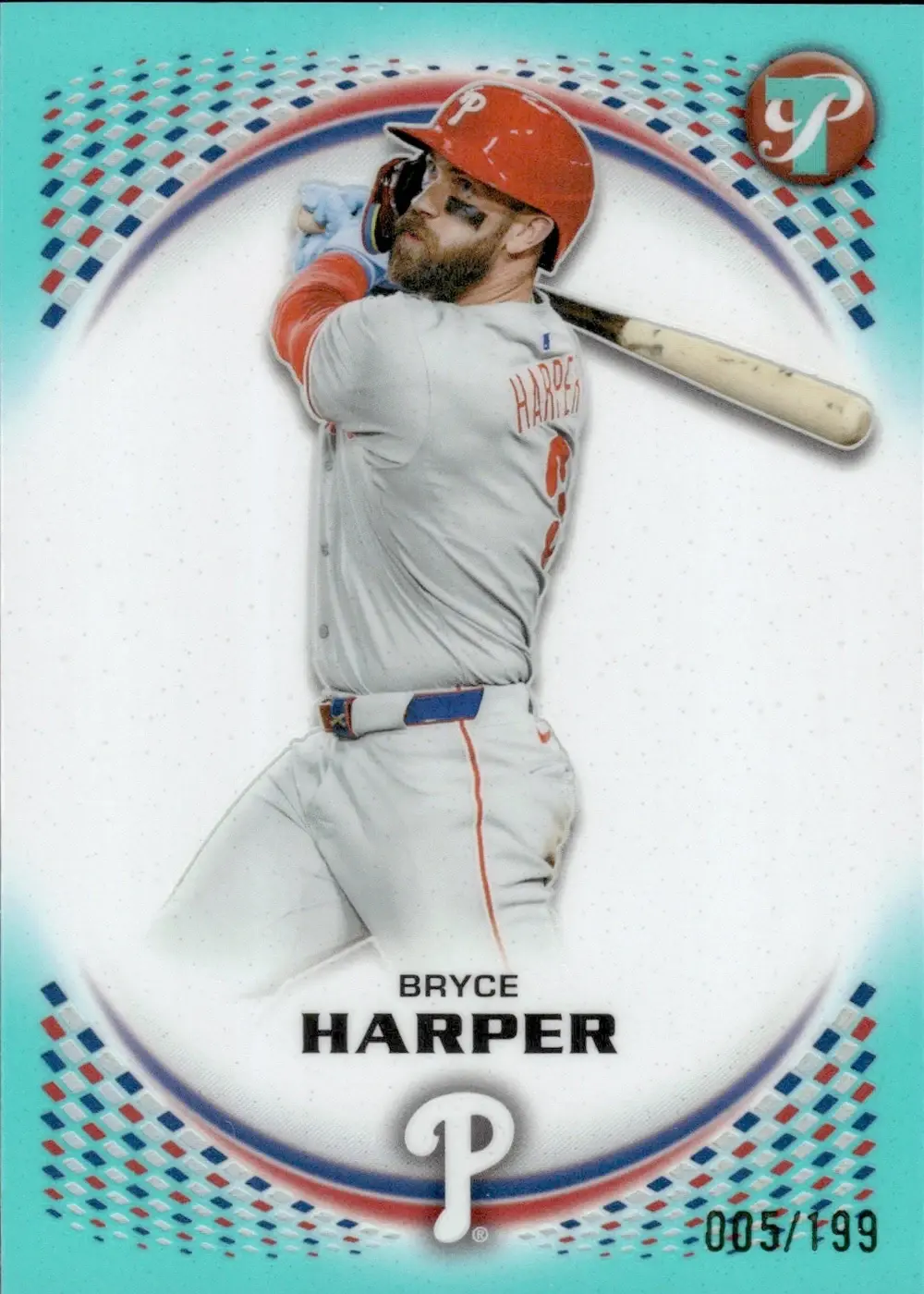
This Bryce Harper card has a blue-green border. The original AI read described it as “Teal Refractor” and extracted a print run of 199.
That is a plausible visual description. But identifying a parallel requires more than describing its color: the name should agree with the product’s checklist.
When we replayed the saved AI read through MyCardFlow’s matching components, the imported checklist returned Aqua for the product’s /199 print run. MyCardFlow flagged the conflict between the AI’s interpretation and the checklist.
| Evidence | Result |
|---|---|
| Original AI parallel read | Teal Refractor |
| Visible serial stamp | 005/199 |
| Imported checklist name for /199 | Aqua |
| Matching outcome | Color conflict flagged; Aqua surfaced for review |
This is why serial numbering matters when identifying numbered cards. It gives the system another piece of evidence to compare with the proposed parallel.
For Harper, checklist matching surfaced a more appropriate name for review. It did not silently apply an automatic correction. Multiple parallels can share a print run in some products, so numbering must be considered alongside the set and visible finish.
Identifying an Insert: Christian Yelich Chrome Rivals – Away
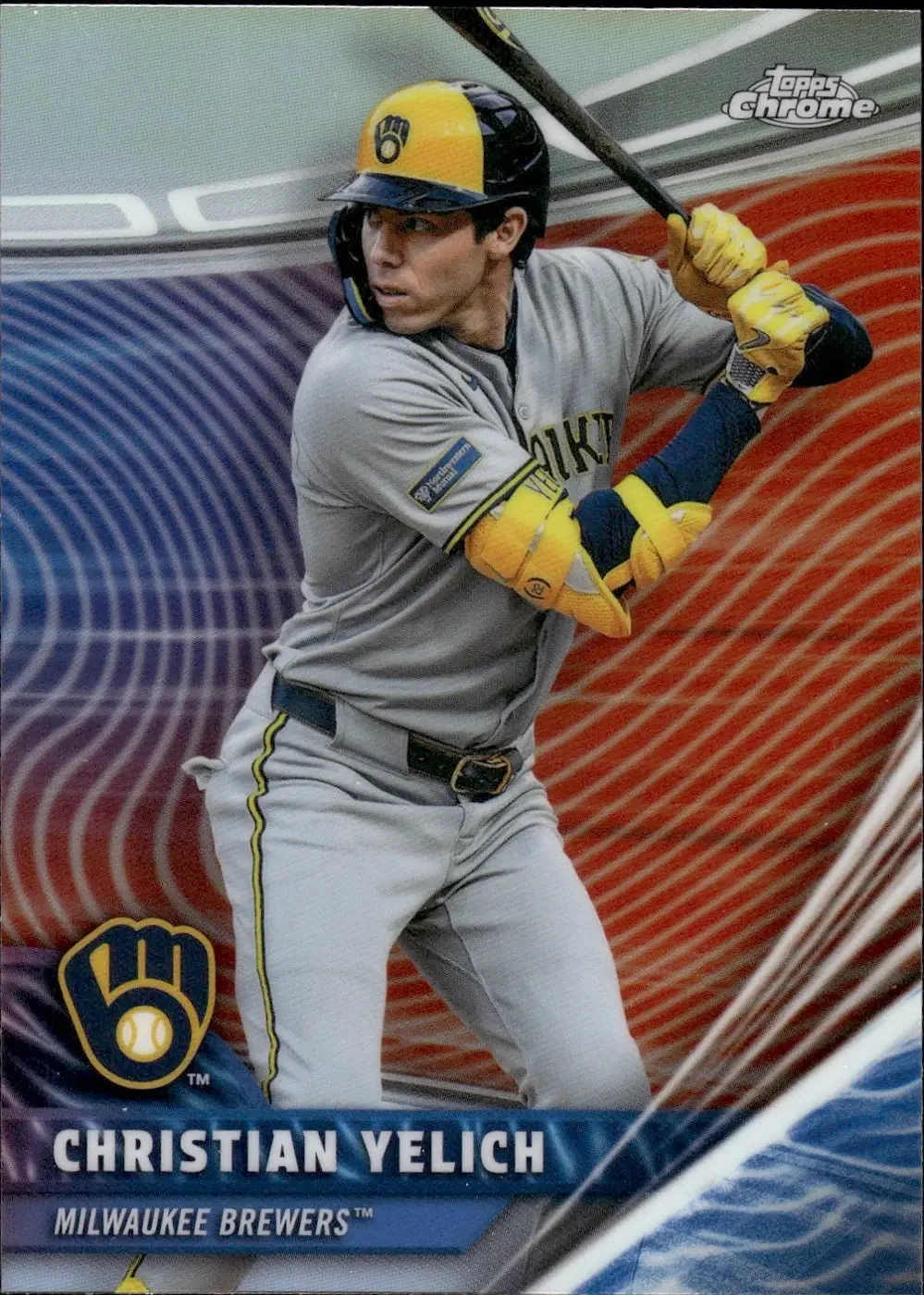
The original AI read identified this Christian Yelich card as “Chrome Rivals.” That captured the insert family, but it left out a detail recorded in the checklist.
Matching the player, year, product, and full card number, RVA-24, returned “Chrome Rivals – Away.”
| Evidence | Result |
|---|---|
| Original AI insert read | Chrome Rivals |
| Card number | RVA-24 |
| Exact checklist designation | Chrome Rivals – Away |
| Matching outcome | More specific insert identification |
The checklist added specificity to an otherwise recognizable card. For a seller preparing a listing, that provides a more precise description and reduces the need to research the insert designation manually.
Harper’s example shows a disagreement being caught. Yelich’s shows a partial identification becoming more complete.
What Does MyCardFlow’s 10M+ Catalog Count Include?
As of the October 16, 2026 verified snapshot, MyCardFlow’s public coverage page reports 10.2M+ across 2,167 checklist products, covering base cards, inserts, autographs, and parallels.
The headline combines:
- Panini-family printing records.
- Topps card-and-printing candidates expanded from checklist rules.
A card-and-printing candidate represents a possible card and printing combination derived from those rules. It does not mean MyCardFlow has individually inspected a physical copy of that combination.
The count is therefore not a count of unique, individually verified physical cards, and it is not an identification accuracy percentage. Held Topps rules and supplemental Panini printing records are excluded from the published total.
You can search MyCardFlow’s checklist coverage by sport or category and set name, with optional brand and year filters. The page also explains the count and shows its verification date.
Coverage varies by product. Finding a set in the catalog does not guarantee that every parallel is covered, and a missing search result does not necessarily mean MyCardFlow cannot identify the card.
How AI and Checklist Matching Improve Card Identification
AI and checklist data contribute different evidence. AI reads what appears in the photograph: names, logos, card numbers, serial stamps, and visual treatments. Checklist matching helps establish whether those observations agree with documented card information.
Where the necessary records are available, MyCardFlow can use that comparison to:
- Check whether a player and card number belong together in a product.
- Supply a more specific insert name.
- Compare a numbered parallel with the product’s documented print runs.
- Surface conflicts that deserve a closer look before listing.
The two examples here demonstrate specific benefits. Harper’s /199 numbering exposed a parallel-name conflict. Yelich’s RVA-24 card number established the Away insert designation.
They do not establish an overall accuracy rate across all cards. Image quality, readable numbering, product coverage, and similar-looking variations still affect identification.
From Card Identification to an eBay Listing
More precise card identification gives sellers a better starting point for listing titles and card details. After identification, MyCardFlow lets sellers review the results and prepare:
- Single-card eBay listings, with separate details and pricing for each card.
- Bulk card lots, selling multiple cards together for one total price.
- You-Pick listings, where buyers select individual card choices.
Uploading or identifying cards does not publish an eBay listing. Sellers review the card details, photos, condition, price, and shipping before publishing. See how to create your first eBay card listing with MyCardFlow.
Frequently Asked Questions
Can MyCardFlow identify parallels and numbered cards?
MyCardFlow uses AI to read visible parallel details and serial numbering. Where applicable checklist information is available, it can compare those observations with documented parallel names and print runs. Some results require seller review, especially when multiple finishes share the same numbering.
How does checklist matching help identify inserts?
Checklist matching compares details such as the product, year, player, and full card number with catalog records. In the Yelich example, that supplied Chrome Rivals – Away where the original AI read said Chrome Rivals.
Does a 10M+ catalog mean every identification is verified?
No. The count describes catalog records and candidates, including printing combinations derived from checklist rules. It does not mean every physical card or scan has been verified, and it is not an accuracy claim.
We’re continually expanding MyCardFlow’s catalog, adding new releases as they come out and importing historical checklists to improve coverage across more years, sets, and parallels.
Should I photograph the back of the card?
Include the back when it contains useful card numbers, serial numbering, or product information. Clear, readable photos provide better evidence for identification. Follow MyCardFlow’s card photography and scanning guide for preparation tips.
Can I review the identification before publishing?
Yes. Review and correct the card details before publishing. MyCardFlow’s supported-card and identification guide explains what to check and where identification has limits.
Example methodology: On October 17, 2026, we replayed saved AI reads from the Harper and Yelich scans through deployed MyCardFlow matching components. Harper’s result flagged a color conflict against imported parallel data; Yelich’s returned an exact checklist insert match. These component tests did not modify the saved cards or publish listings.