
How to Find Sports Card Comps on eBay
Before you price a card, find out what comparable copies have actually sold for. An active listing tells you what a seller wants. A sold result gives you evidence of a sale. When an offer was accepted, eBay’s Product Research can help you check the sale price behind it.
This walkthrough starts with a raw 2024 Topps Chrome Shohei Ohtani #1 base card. Prices in the screenshots were checked on October 15, 2026. Check fresh results before pricing your own card.
1. Search for the card, not just the player
Type the year, product, player and card number into eBay’s search bar. Our first search was 2024 Topps Chrome Shohei Ohtani 1. It returned base cards alongside Refractors, graded copies and other Ohtani cards. Those results cannot be treated as one group of comparable sales.
We narrowed the search to:
2024 Topps Chrome Shohei Ohtani #1 base -refractor -PSA -SGC -CGC -BGS -lot
This is a starting filter, not a guarantee. Adding “base” can miss matching cards whose sellers left that word out. Exclusions can also remove useful results. If the search becomes too narrow, simplify it and inspect more listings manually.
Check the card photos as well as the title. A seller’s description of a parallel or grade can be wrong. For a graded card, match the grading company and numerical grade; for a raw card, examine corners, edges, surface and centering as far as the photos allow.
2. Use active listings to understand the competition
Look at the asking price, shipping charge and purchase format. A current auction bid is not a completed sale, and “or Best Offer” means the seller is willing to consider another price.
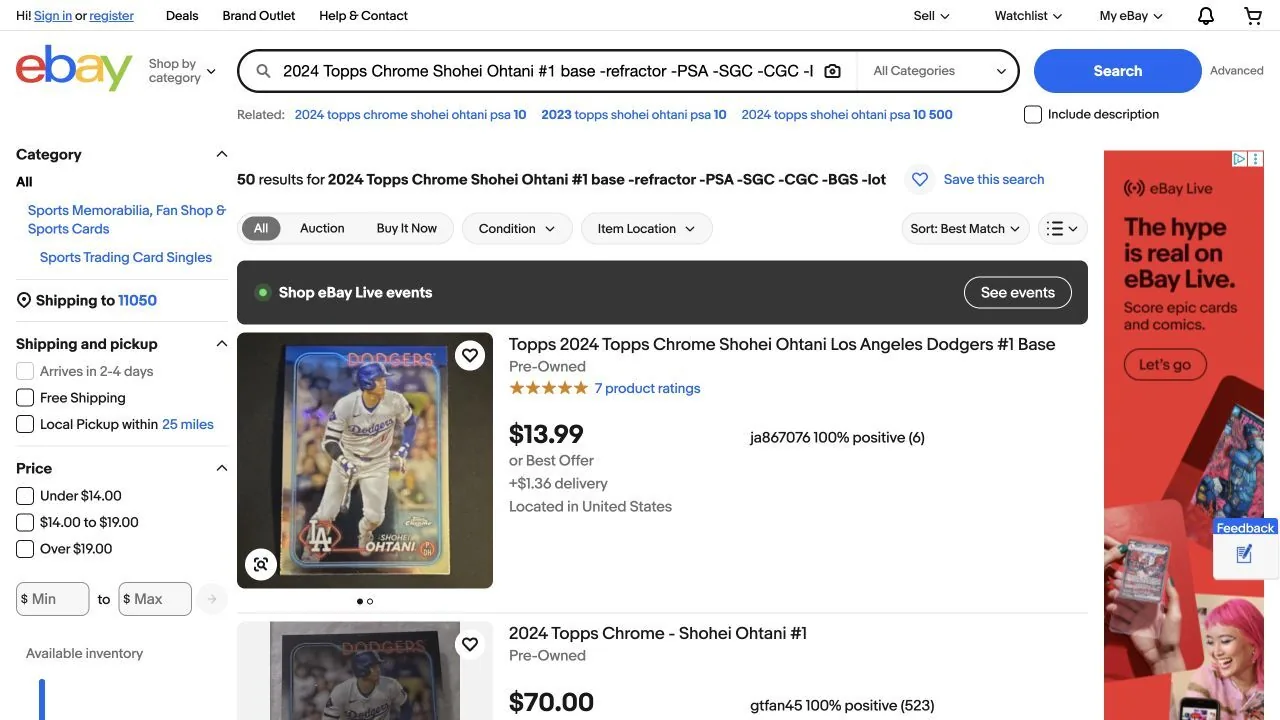
The first listing shown would cost $15.35 before tax at the displayed asking price and delivery charge. That is the cost to buy it at the asking price. It does not tell us whether anyone will pay that amount.
Before using any result, open it and check whether it is a single card, a lot or a variation listing. A low starting price on a You-Pick listing may belong to a different choice.
3. Switch to Sold Items
On desktop, find Show only in the search filters and select Sold Items. Sign in if eBay prompts you to.
Use sold results to build a small comparison set. Record the title, sale date, displayed price, shipping, condition and any offer notation. Avoid treating every completed listing as a sale: a listing can end without selling.
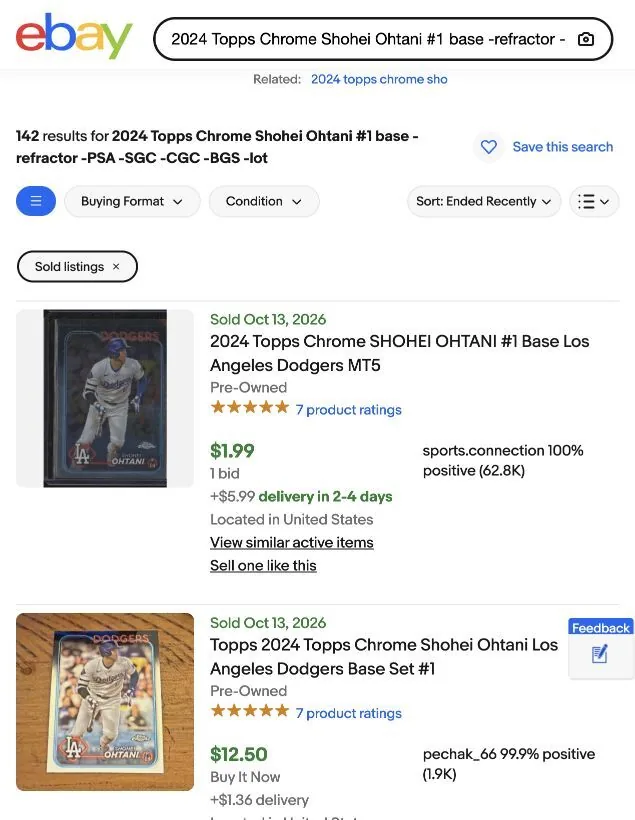
Shipping changes the comparison: these two buyer totals are $7.98 and $13.86 before tax. Comparing only $1.99 with $12.50 exaggerates the gap. These are individual listings, not evidence that every auction will sell below a fixed-price listing.
Compare several recent matches. One unusually high or low result should prompt a closer look at the card, quantity and listing details. If recent matches are scarce, expand the date range, keeping in mind that older prices may be less useful.
4. Check accepted-offer pricing in Product Research
A sold result that offered negotiation needs another check. If eBay displays Best Offer accepted, do not assume the original asking price is what the buyer paid. The result shown below says or Best Offer, which by itself does not prove that an offer was accepted.
eBay says Product Research includes actual sale prices even when a Best Offer was accepted. Sellers with Seller Hub access can find it under the Research tab. It also provides a longer sales history than ordinary completed-listing search.
Search the same card and choose a date range relevant to the sale you are checking. Review individual results before relying on an average: a search that mixes grades, parallels or quantities will not give a useful value for your specific copy.
- Open Seller Hub → Research → Product Research.
- Choose the marketplace and date window. Our example uses ebay.com and September 15–October 15, 2026.
- Search the card, then inspect the result titles. Broad searches can still bring back unrelated cards or You-Pick listings.
- To narrow our example, we pasted this title phrase in quotation marks:
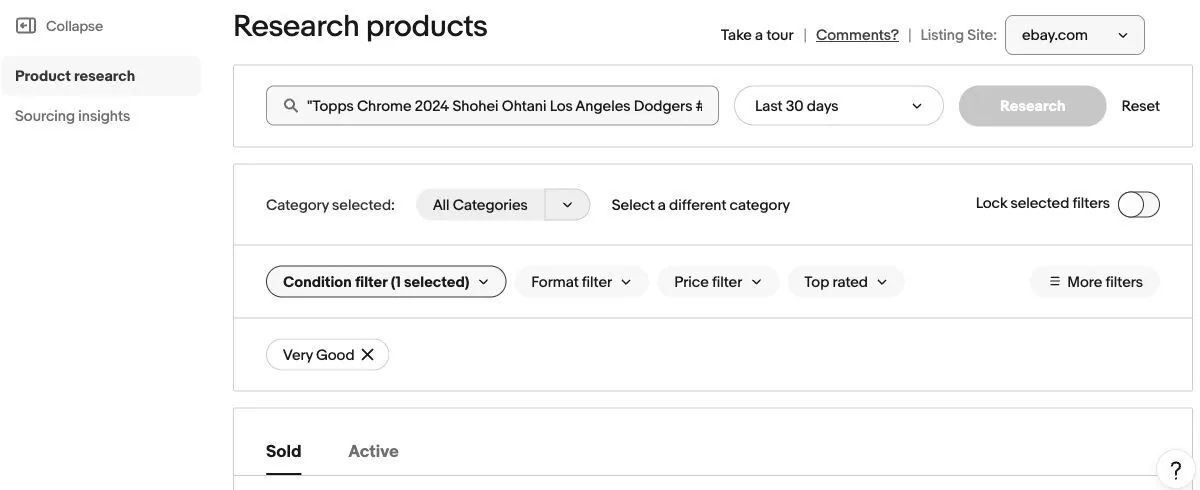
"Topps Chrome 2024 Shohei Ohtani Los Angeles Dodgers #1 Base Set". - Review the selected condition and other filters. Our example has Very Good selected. Choose the condition that matches the card you are researching.
- Compare the individual row’s price, total sold, shipping and date. Match the item ID in its listing link to the public result.
A real example: $15 in sold search, $12 in Product Research
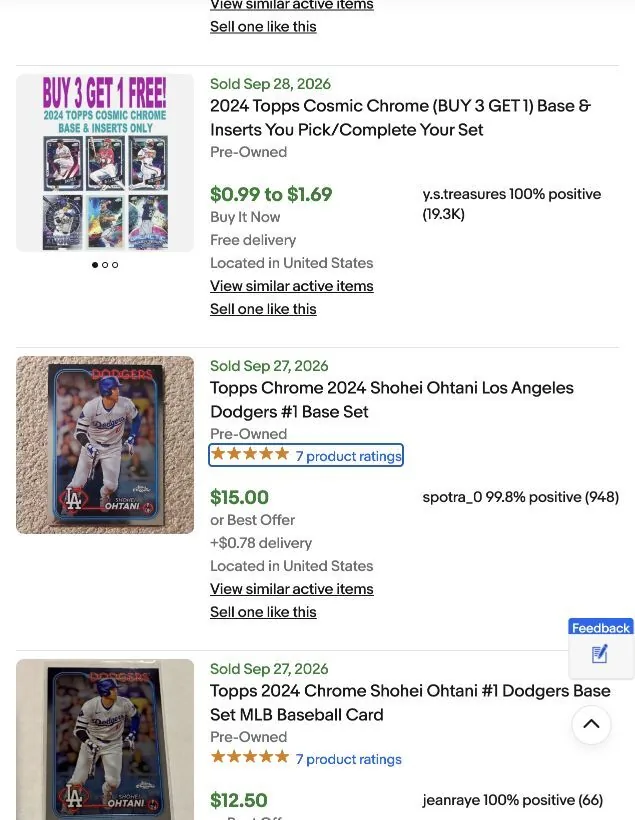
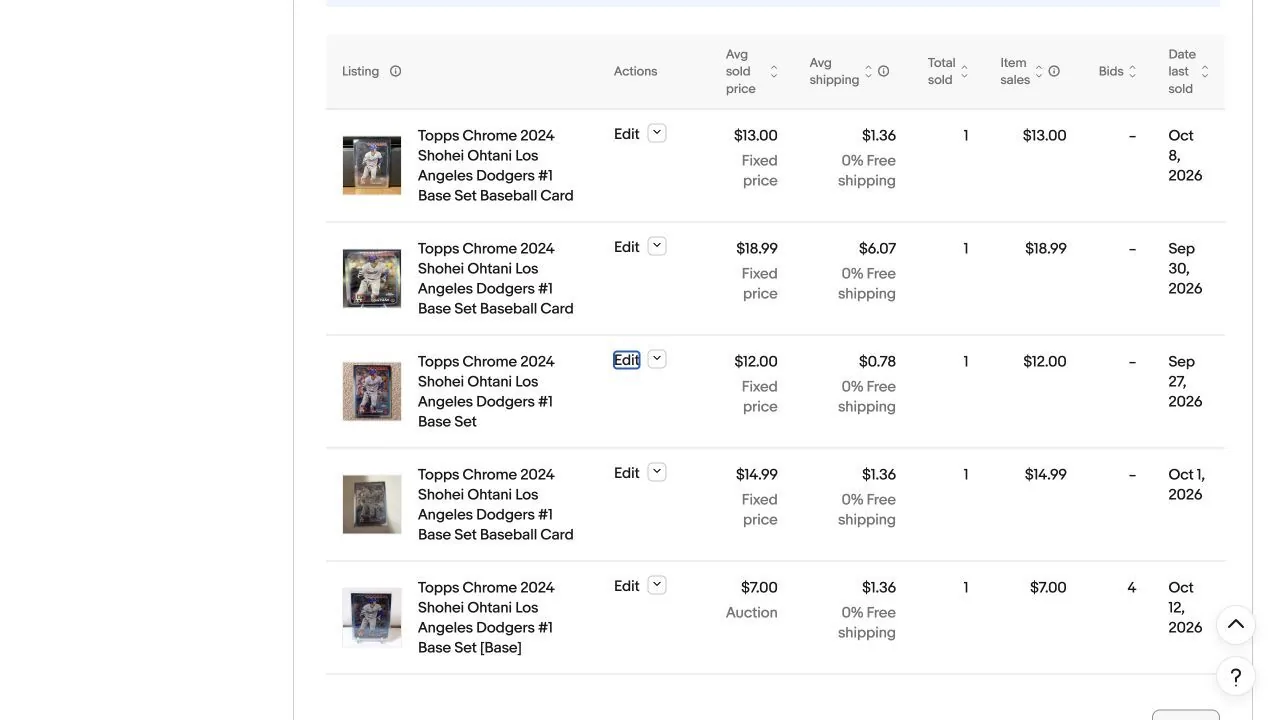
For the same Ohtani listing, the public result shows $15.00, while Product Research reports $12.00. Both show $0.78 shipping and the same sale date. The research row has Total sold = 1, so its $12 average represents one recorded sale in this window, rather than an average across several purchases.
That is a $3 difference in item price, or 20% below the public display. The research buyer total is $12.78 before tax. The sale price was lower than the public display. These screens do not show how the buyer and seller agreed on that price.
Use the recorded $12 sale price when comparing this card with yours. When a research row contains multiple sales, its average is not necessarily the price of any single accepted offer.
Make sure you are looking at the same listing in both views. The same player and card name can appear in many different sales.
5. Compare auctions with Buy It Now
The research screenshot contains a $7 auction with four bids on October 12, and fixed-price sales of $13 on October 8 and $14.99 on October 1. Each of those rows shows one sale and $1.36 shipping. These listings describe the same base card, but condition, photos, timing and seller history may help explain the different prices.
Auction competition matters. Look for repeated recent sales of the exact version and evidence of bidding activity before choosing a low opening price. Several bids can come from the same buyer, so bid count is not a count of unique bidders. A popular player alone does not guarantee demand for every parallel, grade or copy.
For a card that sells infrequently, fixed price gives you more time to wait for the right buyer. If you do choose an auction, use an opening price you can accept if only one bidder participates.
6. Use the comps to choose your price
Keep three numbers separate:
| Number | What it helps you understand |
|---|---|
| Active asking price | The competition buyers can choose from today. |
| Verified comparable sold price | What a buyer paid for a matching card at that time. |
| Your expected net payout | What remains after selling fees, postage and other costs. |
Choose an asking price using the closest recent sales, your card’s condition, competing listings and how quickly you want to sell. Then use our eBay card fee calculator to estimate your payout. Subtract your card cost and supplies when assessing profit.
If you cannot find a close match, leave room for uncertainty in your estimate. A different parallel or grade can provide context, but it is not a direct comp. Avoid inventing a precise value from a handful of unrelated sales.
To turn this research into an asking price, follow our sports card pricing guide.
Prepare your listing after checking the comps
Once you have a price, make the listing easy to verify. Show the actual card, describe its condition and include the details that distinguish it from similar copies. Our sports card title guide explains what belongs in the title.
MyCardFlow helps turn card photos into listing drafts you can review. Use your research when setting the price, then check the photos, identification and shipping before publishing. Follow the sports card listing walkthrough for the next steps.