
How to Reprice Sports Cards That Aren’t Selling on eBay
To reprice a sports card that is not selling on eBay, first verify the listing, then review recent matching sales and current competition. Decide whether to change the price, improve the listing or keep waiting. The age of a listing alone does not tell you which action is right.
A weekly inventory review can be a useful habit, but it does not mean every card needs a weekly markdown. A frequently traded base card and a specialist insert may need very different amounts of time to find a buyer.
1. Check the listing before blaming the price
Confirm the year, product, card number, player and parallel. Make sure the title agrees with the photos and item specifics. Check that the card is available, the quantity is correct and the shipping settings are appropriate.
Our sports card title guide and card photo guide can help you spot listing problems.
Check the photos: Make sure they show the actual card being sold, with clear front and back images. Check focus, lighting and cropping, and show important details such as serial numbering, autographs, grading labels and visible damage where relevant.
Check the item specifics: Review the year, set, player, team, card number and parallel or variation. Check condition and, for graded cards, the grading company and grade. Fill in relevant missing details using information you can verify, and correct anything that conflicts with the card, title or photos.
If the listing misidentifies the card or leaves buyers unsure about its condition, correct that before testing a lower price. A price cut cannot fix inaccurate details or unclear photos.
2. Refresh the sold comps
Use the same exact-card criteria you used when listing: year, set, number, parallel and condition. Look at recent dates, quantities and shipping costs. If an offer-enabled public result looks unusually high, check Product Research before treating that display as the final transaction amount.
Our card comps tutorial shows a real $15 public display paired with a $12 recorded sale for the same item. That difference can change whether your own asking price appears competitive.
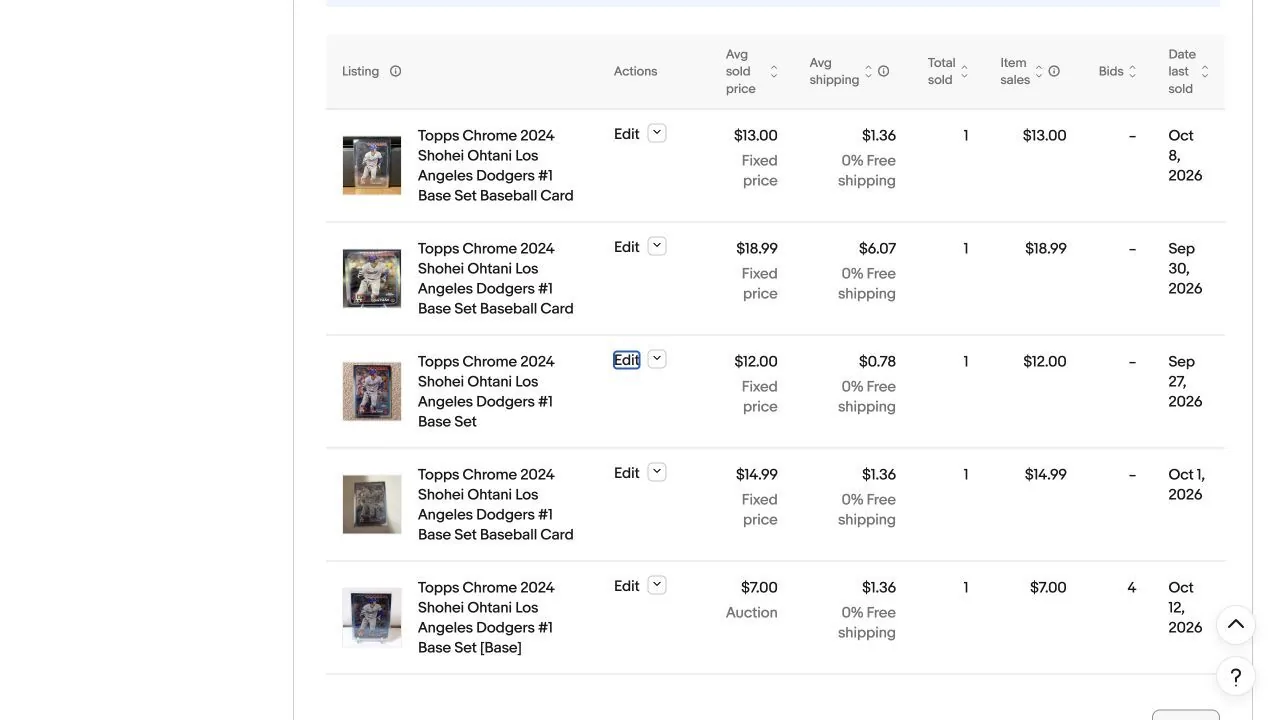
If few matching copies have sold, you may be waiting for a small group of collectors. That alone does not tell you the card is overpriced. Avoid choosing a price from sales of different grades or parallels.
3. Compare the delivered price
Look at item price plus shipping before tax. A $12 card with $5 shipping costs a buyer more than a $14 card with $1 shipping. If you adjust one part, review the total and make sure the shipping method still fits the packed order.
Do not assume a lower shipping charge reduces your actual postage expense. If you absorb more of that cost, recalculate what you keep. Check our shipping policy guide when delivery setup is the issue.
4. Decide what to change
| What you observe | A reasonable next step |
|---|---|
| Wrong version or missing identifying details | Correct the title, specifics and photos; then reassess. |
| Several matching recent sales below your delivered price | Consider lowering the price to match the recent sales. |
| Interest, but few purchases | Review photos, item specifics, delivered price and whether an offer makes sense; interest alone does not identify the cause. |
| Very few matching sales at any price | Consider waiting at fixed price rather than starting a low auction. |
| Low-value cards with too much work per sale | Reconsider singles, a related lot or a You-Pick format. |
For the offer route, use our Best Offer setup guide. For an auction, review auction versus Buy It Now before choosing an opening price. An auction with only one interested bidder can finish at a price you would otherwise reject.
5. Make one change and keep a short record
Suppose a card has been listed for 45 days at $20 plus $1.50 shipping. After reviewing several close matches, you decide to test $18 plus the same shipping. Record the original $21.50 buyer total, the new $19.50 total and the evidence behind the change.
The 10% reduction is just an example. The right change depends on the card and its recent sales. Choose a review interval that gives a card’s usual buyers time to respond. Avoid changing price, title, photos and shipping together unless the listing needs correction; otherwise you will not know what helped.
Open the listing’s revision controls in Seller Hub, update the intended price and review the listing after saving. eBay restricts some revisions depending on format and bidding activity; check its listing revision instructions. Review offer settings as well if the card accepts offers.
6. Check whether singles are worth the work
A card can be correctly priced and still take more work than the expected return justifies. A related group might suit bulk card lots; set-building inventory may suit You-Pick listings. Use the bulk lot guide or You-Pick seller guide to compare the workflows.
When moving a card into a lot or You-Pick listing, remove its old listing so you cannot sell the same physical card twice. Our card organization guide explains how storage locations support fulfillment.
Know when to leave a price alone
If the listing is accurate, the buyer total is reasonable and close matches sell only occasionally, you may be better off waiting. Decide how much time and storage you are willing to commit. Use the eBay card fee calculator and pricing guide to check your costs against recent sales.