
How to Write eBay Sports Card Titles with MyCardFlow
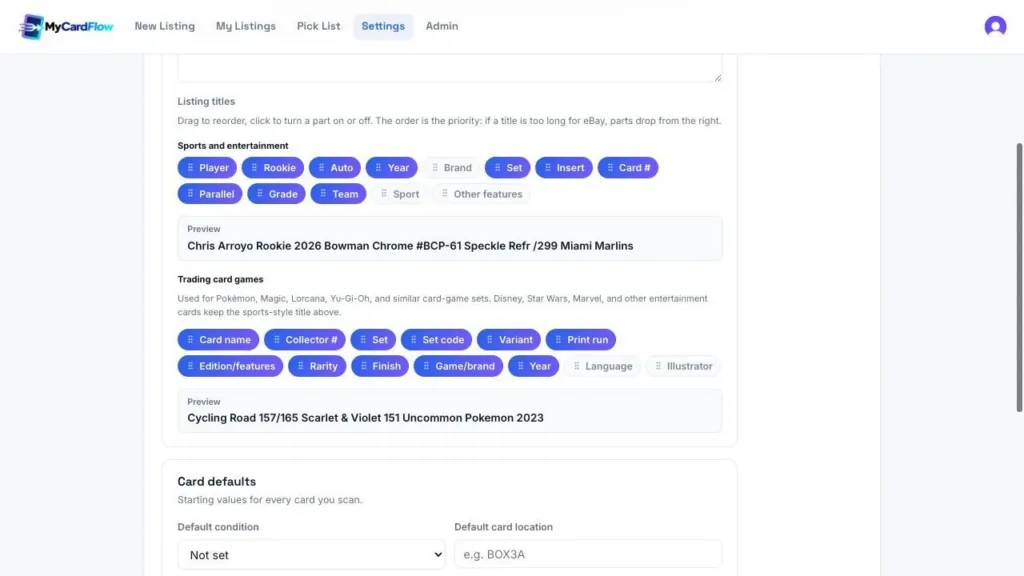
Select fields to include and drag them into priority order. The preview lets you inspect the result before saving. View full screenshot.
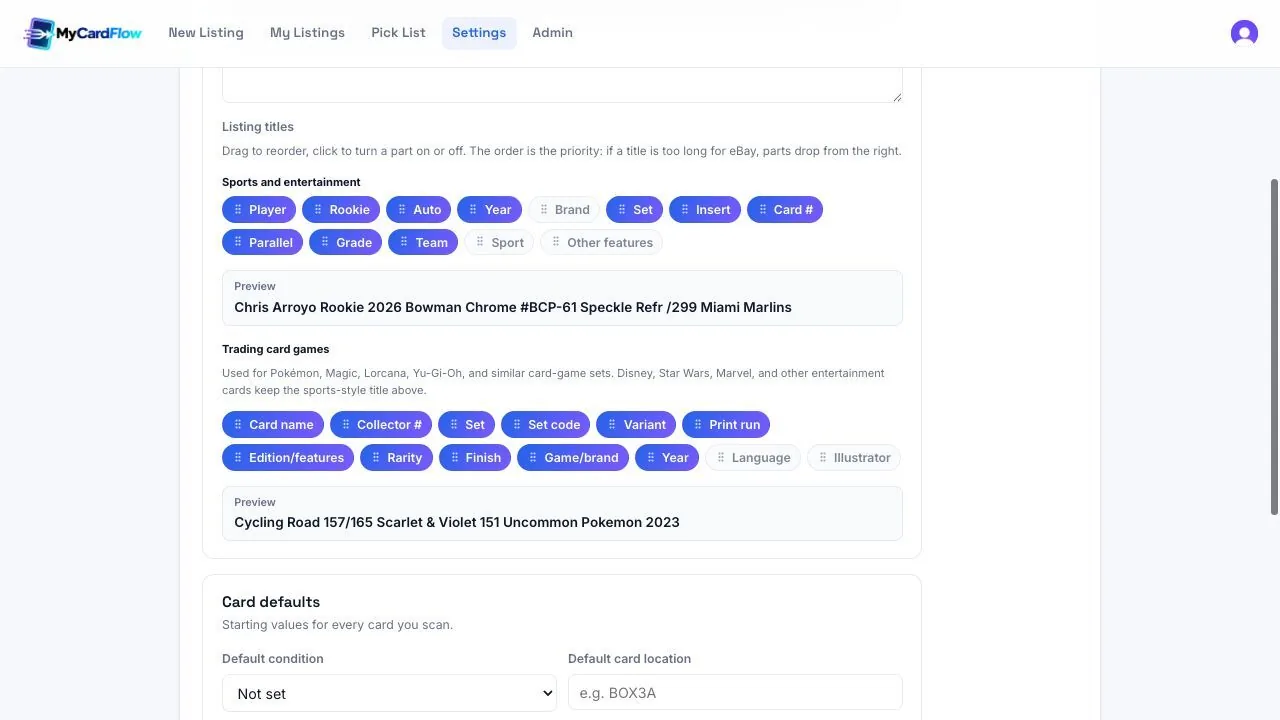
A useful eBay sports card title identifies the player, year, set, card number, and the details that distinguish that copy, such as its parallel or serial numbering. MyCardFlow’s title builder lets you choose which fields appear and drag them into priority order, then review the generated title before publishing.
The goal is a title a buyer can understand and verify against the photos. Adding more words is only useful when those words describe the actual card.
What belongs in an eBay sports card title?
Start with the card’s identity: player, year, product or set, and card number. Add the distinguishing details buyers need to tell it apart from the base version. Rookie status, an autograph, a parallel, print run, or an actual professional grade may matter when they genuinely apply.
eBay limits listing titles to 80 characters and recommends clear, relevant wording. Leave out unrelated player names, unsupported claims, and filler that crowds out the card’s identity. See eBay’s listing guidance.
1. Open the MyCardFlow title builder
Go to Settings → Listings → Listing content. Under Listing titles, you will see separate builders for Sports and entertainment and Trading card games.
Use the sports and entertainment builder for sports cards and entertainment subjects. The trading-card-game builder has fields suited to games such as Pokémon, Magic, Lorcana, and Yu-Gi-Oh. Selecting useful fields for each avoids forcing every card into one naming pattern.
2. Choose the fields you need
Click a field to switch it on or off. For a typical sports-card workflow, start with Player, Year, Set, Card #, and Parallel. Add other fields when they convey information your inventory actually contains.
A title builder assembles the card details it is given. It does not turn an uncertain identification into a confirmed one. Check the actual card’s year, set, number, insert, and parallel before relying on the resulting title.
3. Put the most important details earlier
Drag fields to change their order. In MyCardFlow, order is also priority: when a title is too long, parts farther to the right have lower priority and can drop out. Keep the details that uniquely identify your card ahead of optional context.
For example, if you sell many parallels, placing Parallel ahead of Team can help preserve the version while allowing less essential wording to drop. Review the preview and test your choice against both short and long card names. There is no one field order that fits every inventory.
4. Compare a vague title with a specific one
Consider an illustrative title such as “Great baseball rookie card rare must see”. It says little about the card itself. A specific structure would be “[Player] [Year] [Set] #[Card number] [Parallel]”, adding rookie, autograph, or grade information only when verified.
The preview in the screenshot shows how the builder combines real fields into a readable title. Treat that as a formatting example, not evidence that every card from that set has the same parallel or print run.
5. Save, then review the actual listing
Select Save settings. When preparing a listing, read the complete title alongside the card photos and details. Confirm the number and parallel survived any shortening and remove information that does not apply.
Review the listing description and item specifics too. The title is one part of an accurate listing, and a well-formatted title alone does not guarantee search placement or a sale.
These settings guide generated titles; saving a template is not a bulk rewrite of existing live eBay listings. A You-Pick also needs a shared title that accurately describes its whole group of choices, rather than the title of one card.
Common title mistakes to catch
- The wrong parallel: similar foil or color does not mean the same named version.
- A missing card number: it may distinguish cards with the same player and year.
- A grade on an ungraded card: do not present a raw-card opinion as a professional grade.
- Repeated product wording: check for redundant brand or set text using valuable space.
- An important field at the end: a long name can push it beyond the limit.
Frequently asked questions
Can I use a different title pattern for Pokémon?
Yes. The Trading card games builder includes fields such as card name, collector number, set, set code, rarity, finish, and language.
Does changing the title builder update existing eBay listings?
No. Treat it as a setting for generated listing titles, not a bulk editing action on live listings.
Should I fill all 80 characters?
Use the space for relevant identifying information. Do not add unrelated or repetitive words simply to reach the limit.
Use a consistent listing workflow
Combine clear titles with Store category mappings and accurate photos. Our sports-card listing page shows how the review steps fit together.
Put it into practice with MyCardFlow
Choose your title fields once, then check each generated title against the card before publishing.