
MANAGE YOUR ACCOUNT
Set up eBay shipping policies
Create or refresh eBay shipping policies in MyCardFlow. Choose Standard Envelope or Ground Advantage, set handling time and select your defaults.
Add a shipping policy
Create a shipping policy from MyCardFlow and optionally select it as your default. Connect eBay first.
- Open Settings → eBay. Under Shipping & policies, select Create shipping policy.
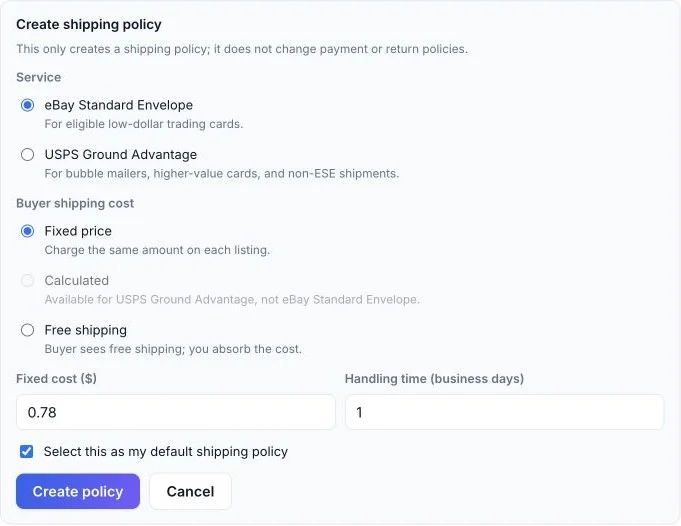
- Choose eBay Standard Envelope for eligible cards, or USPS Ground Advantage for packages such as bubble mailers.
- Choose the buyer’s shipping cost: Fixed price, Free shipping, or Calculated for Ground Advantage. Enter a fixed cost when applicable and set your handling time in business days.
- Leave Select this as my default shipping policy checked if you want to use it by default, then select Create policy. This creates the policy in your connected eBay account.
- Check the selected Shipping policy. If you manually change the dropdown afterward, use Save settings. You can choose a different shipping policy while reviewing a listing.
Can I use calculated shipping with Standard Envelope?
This form offers calculated shipping for USPS Ground Advantage, not eBay Standard Envelope. For calculated shipping, supply the required package details when preparing the listing.
Will this change my payment or return policies?
No. Create shipping policy creates a shipping policy only. Your payment and return policies have separate selections.
What if I already made a policy on eBay?
Select Refresh from eBay, choose it in the Shipping policy dropdown, and save your settings.
Shipping requirements differ by listing: the bulk-lot listing guide explains why you should check shipping for the whole package.