
LIST & SELL
Create eBay bulk card lots
Build an eBay bulk card lot in MyCardFlow. Review included cards, preview the photo grid, set a total price and check shipping before publishing.
Bulk lots
Sell a group of cards together in one listing, with one price for the entire lot.
- Choose Bulk Lot, select your photo mode, and add and identify the cards.
- Review the included cards. Use Leave out of lot to exclude a card from the listing, or edit its details if needed.
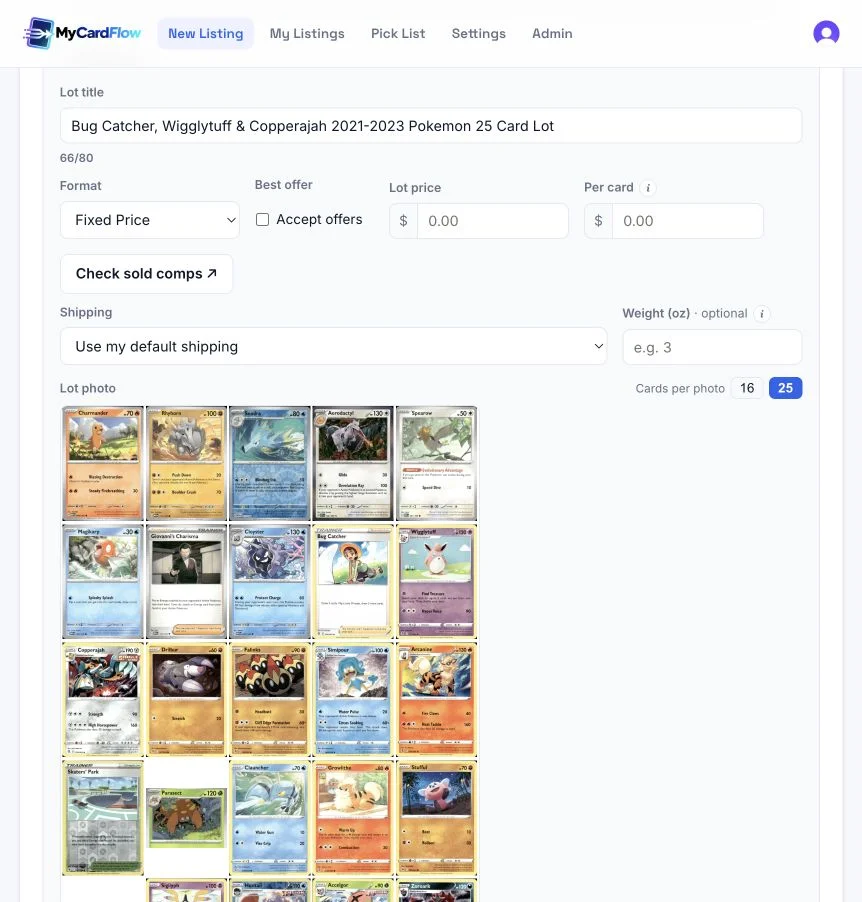
- Review the lot title and generated photo grid. Choose the number of cards per photo.
- Set a Lot price or enter a Per card amount to calculate the total. Choose the format, shipping, lot location, and Store category for the whole listing, then use List lot on eBay.
Does each card get its own price?
The buyer purchases the whole lot at the lot price. Per card is a way to calculate that total; it does not create separate listings or let buyers select individual cards.
Can I run an auction or accept offers?
Lots support Fixed Price and Auction. Accept offers is available for fixed-price lots, including through the default in Settings → Listings. It does not apply to auctions.
What should I check before listing?
Check the included cards, title, grid images, total price, and shipping for the whole package. The sold-comps link starts with the first included card, so spot-check stronger cards yourself when pricing a mixed lot.
If buyers should choose cards individually, use You-Pick listings instead of selling the entire lot for one price.
To organize the lot in your own eBay storefront, review store-category choices before publishing.