
LIST & SELL
Create single-card eBay listings
Create individual eBay card listings with MyCardFlow. Review identification, edit prices, choose fixed price or auction, and configure offers.
Singles
Use Singles when each card should have its own eBay listing. A batch can contain one card or a stack.
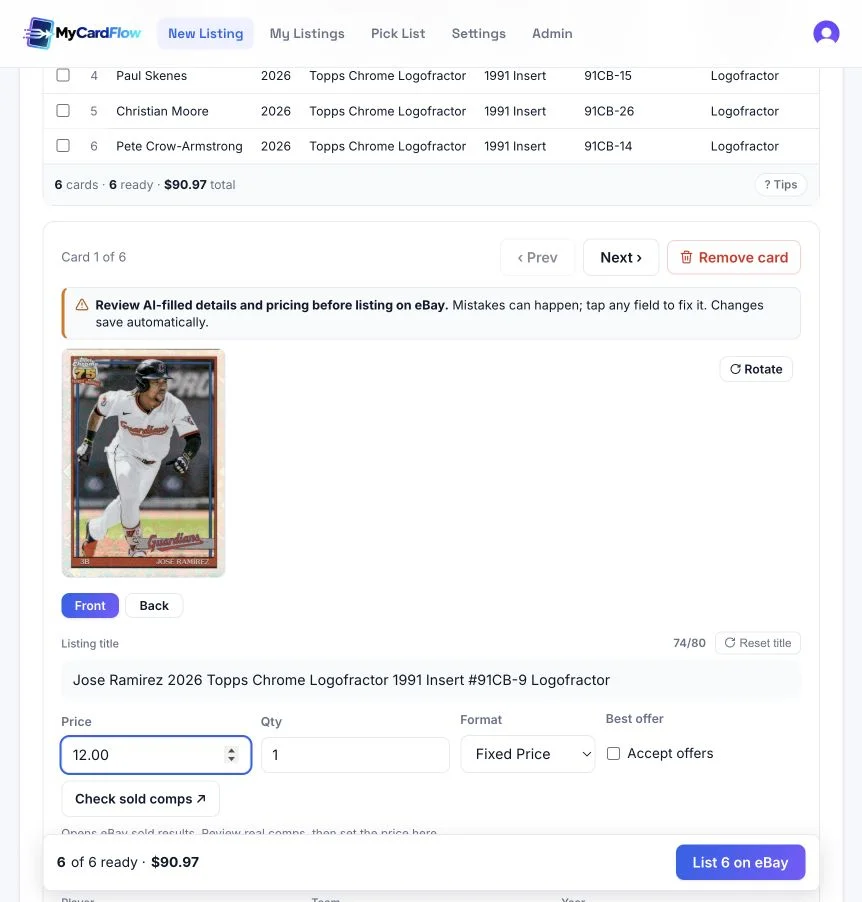
- Add and identify your cards, then select a card to review its photo and details.
- Check the player or card name, set, number, parallel, condition, and title. Correct any mistakes before listing.
- Set the price and quantity, choose Fixed Price or Auction, and check shipping and the card’s storage location.
- Review the ready cards and use the listing button to publish them to eBay.
Can I edit several cards at once?
Yes. Use Batch defaults for starting values, or select rows for bulk edits. Batch store category stays linked to cards that use the batch category, including cards added later; individual category overrides are preserved. Apply to all can overwrite existing edits, so review its effect carefully. All prices lets you adjust current prices by a percentage.
How do I choose a price?
Use Check sold comps to open eBay sold results, compare relevant cards, then enter your price in MyCardFlow. Check the exact parallel, condition, and other distinguishing details. The price remains editable before publishing.
Can buyers make offers?
For fixed-price singles, enable Accept offers. You can also enable it by default in Settings → Listings → Offers. Auctions do not use this setting.
Before publishing, follow the eBay shipping policy setup guide to choose the policy that fits the card and its packaging.
Allow offers by default
Enable offers at the account level in MyCardFlow so new fixed-price singles and lots start with offers allowed.
- Open Settings → Listings and find Offers.
- Check Accept offers by default.
- Select Save settings.
- Review Accept offers when preparing a new fixed-price single or lot. You can turn it off for an individual listing.

Does this update existing eBay listings?
No. It is a default for new fixed-price singles and lots in MyCardFlow, not a bulk update to existing listings on eBay.
Does this automatically accept an offer?
No. It allows buyers to make offers; it does not automatically accept them. The default does not apply to auctions or You-Pick listings.
For title and description defaults alongside offers, see listing settings and defaults.